No products in the cart.
-6%

Apple accessories
Apple Magic Mouse 2
Apple Magic Mouse 2 specifications and price in Kenya
- Lightning Port.
- Magic Mouse 2 Is Completely Rechargeable, So you eliminate The Use Of Traditional Batteries.
- It’s Lighter, Has Fewer Moving Parts Thanks To Its Built-In Battery And Continuous Bottom Shell, And Has An Optimized Foot Design.
- Nd The Multi-Touch Surface Allows You To Perform Simple Gestures Such As Swiping Between Web Pages And Scrolling Through Documents.
- This product is backed by a one-year satisfaction warranty of a brand-new Apple product.
The Ultimate in Precision and Convenience
Ask on WhatsApp
KSh 14,500.00 KSh 15,500.00
Introducing the Apple Magic Mouse 2, a revolutionary wireless mouse that takes your computing experience to the next level. Designed with innovation and precision in mind, this mouse seamlessly blends style with functionality, making it the perfect companion for your Mac or MacBook.
Sleek and Minimalist Design That Matches Every Setup
The Apple Magic Mouse 2 carries forward Apple’s signature design ethos—clean, minimal, and sophisticated. Crafted with a seamless, low-profile form, it effortlessly blends into any modern workspace. The mouse features a sleek, curved shell that’s pleasing to the eye and designed for both functionality and aesthetics, making it a perfect companion for MacBooks, iMacs, and even iPads.
The Magic Mouse 2 is constructed from high-quality materials, including a smooth, multi-touch surface and sturdy internal components. Its top shell glides into the aluminum base seamlessly, creating a two-tone finish that matches Apple’s aluminum devices. Available in Silver and Space Gray, it complements the design language of your Apple ecosystem beautifully.
With its ultra-thin body and low silhouette, the Magic Mouse 2 is ergonomically designed for lighter touches and long hours of use. It supports both left- and right-handed users, although its ambidextrous shape slightly favors those who prefer minimalist gestures and fingertip control over bulky hand rests.
The mouse’s lightweight feel and low height reduce strain during extended periods of use, making it an ideal choice for professionals, students, and digital creatives alike. Despite its compact form, the surface area is large enough to support full multi-finger gesture inputs without requiring a large hand movement area.
Apple also designed this mouse with portability in mind. It’s slim and lightweight enough to fit in small laptop bags or sleeves, making it a favorite for users who work on the go. Whether you’re moving between home, office, or café, the Magic Mouse 2 is a stylish and practical companion.
In a sea of over-designed peripherals, the Apple Magic Mouse 2 stands out by being intentionally simple. Its understated elegance and attention to detail make it a subtle yet powerful tool that complements any Mac-centric setup with visual harmony and ease of use.
Built-in Rechargeable Battery for Long-Term Convenience
One of the defining features of the Magic Mouse 2 is its built-in rechargeable battery, which eliminates the need for disposable batteries and reduces long-term maintenance. This integrated lithium-ion battery offers excellent longevity, delivering weeks of usage on a single charge depending on your activity level.
Charging the Magic Mouse 2 is simple and efficient. Using the included Lightning to USB cable, users can plug the mouse into any USB-A port on a Mac or USB power adapter. A quick two-minute charge provides enough power for a full day of work, while a full charge can last up to a month or more, depending on use.
Apple designed the battery to optimize energy efficiency without compromising performance. The mouse intelligently enters a low-power sleep mode when not in use, preserving battery life. It quickly wakes upon touch, ensuring you’re never waiting on your device to respond when you’re ready to work.
While some users may point out that the charging port is located on the underside of the mouse, meaning it can’t be used while charging, the long-lasting battery life means you’ll rarely encounter this limitation. A quick charge during a break is often all you need to keep it going throughout your workday.
By transitioning away from disposable AA batteries, Apple not only streamlined the Magic Mouse 2’s design but also aligned it with its environmental goals. The rechargeable battery reduces electronic waste and long-term costs while offering an elegant, efficient charging experience.
Whether you’re working at a desk all day or using your Mac on the go, the Magic Mouse 2’s rechargeable battery system ensures minimal interruption and maximum reliability. It’s a smart upgrade over older models and competing wireless mice that still rely on removable batteries.
Multi-Touch Surface for Intuitive Gesture Control
The Apple Magic Mouse 2 transforms the traditional mouse experience with its innovative Multi-Touch surface, allowing users to interact with their Mac in more natural, intuitive ways. Instead of buttons or scroll wheels, the entire top surface acts as a touch-sensitive interface—supporting gestures like swiping, scrolling, zooming, and more.
One of its standout features is the smooth, inertia-based scrolling. With a simple swipe of your finger, you can scroll through long documents or web pages with fluid, momentum-driven motion that mimics the feel of a touchscreen. This feature adds a sense of responsiveness that traditional scroll wheels simply can’t match.
Beyond scrolling, you can also use gestures like swipe left/right to navigate between web pages or full-screen apps, double-tap for Mission Control, or pinch for zoom (in some applications). These gesture controls eliminate the need for additional buttons, creating a cleaner design and faster workflow for Mac users.
The gesture system is customizable via System Settings > Mouse, allowing you to turn features on or off and adjust tracking speed. This gives users the flexibility to tailor the experience to their workflow, whether for browsing, editing, or navigating through macOS Ventura or newer.
The surface also functions as a seamless button—clickable anywhere. The entire mouse body acts as one large mechanical button, with support for both left and right clicks depending on where pressure is applied. The subtle tactile feedback confirms without the need for separate, noisy components.
With the Multi-Touch surface, Apple reimagines how a mouse can work in a touch-first world. It bridges the gap between trackpads and traditional mice, offering a familiar pointer tool with all the power and flexibility of gesture-based control.
Wireless Bluetooth Connectivity for a Tidy, Seamless Experience
The Magic Mouse 2 is all about convenience with its Bluetooth wireless connectivity, making it super easy to pair with any compatible Mac—no need for those pesky dongles or receivers. Once you’ve paired it up, the mouse connects automatically every time your Mac wakes up, giving you a smooth, cable-free experience that keeps your workspace tidy and lets you move around freely. Thanks to Bluetooth 4.0 (or later), you get a strong, stable connection with minimal latency, so you won’t have to deal with annoying input lag or disconnections while you’re working. This is especially beneficial for designers, editors, and anyone who relies on precise, real-time cursor movement in their creative or technical tasks.
Getting started is a breeze—just flip the power switch and head to System Settings > Bluetooth. After you connect, your Mac remembers the pairing, so reconnecting is automatic. This makes the setup process nearly effortless, even if you’re switching between different Macs or setting up a new workspace.
And it doesn’t stop at just MacBooks and iMacs. The Magic Mouse 2 can also connect to iPads running iPadOS 13.4 or later, transforming your iPad into a more desktop-like experience. This opens up exciting new productivity options for mobile creatives and professionals on the go. In the end, Bluetooth connectivity makes the Magic Mouse 2 as versatile as it is practical. It cuts down on clutter, enhances mobility, and delivers a seamless experience across Apple’s ecosystem—perfect for both minimalist setups and dynamic work environments.
Seamless Integration with macOS Ecosystem
One of the most impressive aspects of the Magic Mouse 2 is how effortlessly it integrates into the Apple ecosystem, especially with macOS. Once you connect it, the Magic Mouse 2 becomes part of a synchronized setup where gestures, preferences, and responsiveness align beautifully with Apple’s design philosophy.
It takes full advantage of macOS-specific features like Mission Control, App Exposé, and Desktop navigation, making it easier for both seasoned pros and newcomers to streamline their workflows. macOS automatically recognizes the Magic Mouse 2 and offers customization options in System Settings > Mouse. Here, you can adjust click settings, gesture functions, and pointer speed.
With iCloud syncing, your settings and preferences can follow you across different Macs. This is particularly useful for those balancing both personal and work devices, as it minimizes setup time and keeps everything consistent across all your machines linked to your Apple ID. With software updates rolled out through macOS, the Magic Mouse 2 remains optimized over time.
Apple regularly introduces performance tweaks, gesture enhancements, and battery improvements, ensuring that your mouse continues to provide value and functionality long after your purchase. In short, the Magic Mouse 2 is more than just a peripheral; it’s a vital part of macOS itself. Designed by Apple for Apple, it integrates seamlessly into your computing experience, boosting productivity, creativity, and the sheer joy of using your Mac.
Eco-Friendly and Built with Sustainability in Mind
In line with Apple’s increasing focus on environmental responsibility, the Magic Mouse 2 has been thoughtfully designed with sustainability at its core. This device incorporates recycled materials and prioritizes energy efficiency and durability, all in support of Apple’s ambitious goal to achieve carbon neutrality across its entire product lineup. Thanks to its built-in rechargeable battery, there’s no need for disposable batteries, which significantly cuts down on battery waste throughout the device’s lifespan. Just one Magic Mouse 2 can save users from tossing out dozens of AA batteries each year, making a direct contribution to a cleaner planet and lower costs for users.
Apple’s commitment to eco-friendliness is also evident in its packaging. The Magic Mouse 2 is delivered in compact, recyclable packaging that minimizes plastic use and features responsibly sourced materials. This sleek, minimalist design not only looks great but also helps reduce the environmental impact of shipping. The materials used in the Magic Mouse 2 adhere to Apple’s rigorous environmental standards, ensuring they are free from harmful substances like mercury, brominated flame retardants (BFRs), PVC, and beryllium. Even the aluminum in the product is crafted from 100% recycled material, further lowering its carbon footprint.
Related products
- Apple accessories
Apple 20W USB-C Power Adapter
Apple 20W USB-C Power Adapter specifications and price in Kenya
The Apple 20W USB-C Power Adapter price in Kenya is 4,500 shillings.
Specs:
- Charging Method: Wired
- Color: White
- Cable is Required & Not Included
- Plugs Into an Available Wall Socket
- 1 x USB Type-C Charging Port
- Provides Up to 20W of Power
- Fast Charging for iPhone 8 & Late
Fast and Efficient Charging
SKU: n/a - Apple accessories
iPad Air 11-inch (M4) Magic Keyboard – Price in Kenya | Phones Gallery
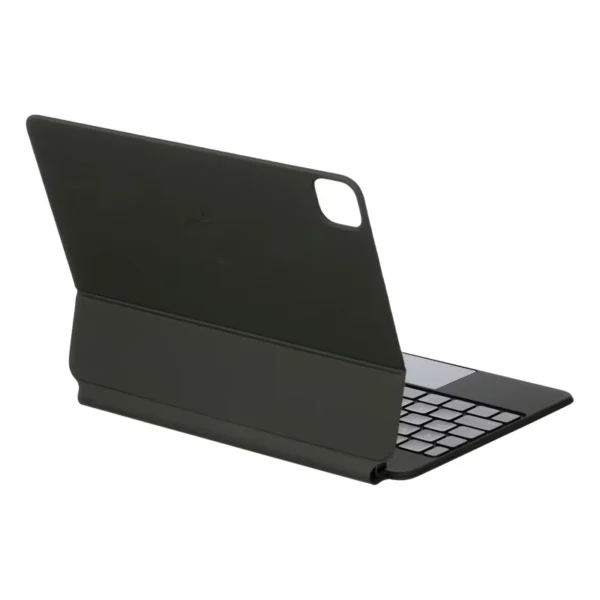
iPad Air 11-inch (M4) Magic Keyboard in Kenya — KES 43,500 at Phones Gallery Kenya.
iPad Air 11-inch (M4) Magic Keyboard – Key Features
- Fit sixe: 11-inch (M4) iPad Air
- Antilever design
- Large glass trackpad
- USB-C connector for pass-through charging
- front and back protection (folds into a case)
SKU: id118756